Collision checking
A collision check answers one question about the environment: which pairs of links are closer than a threshold, and how close are they? Planners ask it thousands of times per plan; you ask it directly to validate a state or a trajectory, to measure clearance, or to test a new obstacle. The checks run in contact managers, collision worlds that Bullet and FCL implement and the environment keeps in sync with its scene.
Check one state
There is no one-call shortcut on Robot: take a contact manager from the environment, give it
the link poses of the state to check, and run a test.
tesseract_collision_example.py
is the same pattern as a script.
from tesseract_robotics.planning import Robot, box, create_obstacle
from tesseract_robotics.collision import (
    ContactRequest,
    ContactResultMap,
    ContactResultVector,
    ContactTestType,
)
import numpy as np

locator = GeneralResourceLocator(paths=[get_tesseract_resource_path()])  # the tesseract-robotics-nanobind-support wheel
robot = Robot.from_tesseract_support("abb_irb2400", locator)
joint_names = [f"joint_{i + 1}" for i in range(6)]
joints = np.array([0.5, -0.5, 0.5, 0.0, 0.5, 0.0])

# An obstacle at the flange gives the check something to find
create_obstacle(robot, "box", box(0.3, 0.3, 0.3), robot.fk("manipulator", joints, "tool0"))

# Update state, then sync the manager with the new link transforms
robot.set_joints(joints, joint_names=joint_names)
state = robot.env.getState()

manager = robot.env.getDiscreteContactManager()
manager.setActiveCollisionObjects(robot.env.getActiveLinkIds())
manager.setCollisionObjectsTransform(state.link_transforms)

# contactTest() populates the ContactResultMap passed in (returns None)
contacts = ContactResultMap()
manager.contactTest(contacts, ContactRequest(ContactTestType.ALL))

print(f"Collision-free: {contacts.size() == 0}")

# Flatten to a vector for iteration
results = ContactResultVector()
contacts.flattenMoveResults(results)
for i in range(len(results)):
    r = results[i]
    print(f"{r.link_ids[0]} <-> {r.link_ids[1]}: distance = {r.distance:.4f} m")
Holding a ContactResultVector element
results[i] is a reference into the vector, not a copy: results[i].distance = d changes
results. A reference must not outlive the storage it points at, so while Python holds one,
the calls that can reallocate or free the elements (append, clear, and
ContactResultMap.flattenMoveResults(results)) raise ContactResultHeldError, a
BufferError, and change nothing. bytearray refuses to resize under an exported buffer the
same way.
import copy

from tesseract_robotics.collision import ContactResultHeldError

r = results[0]
try:
    results.clear()               # r is still held
except ContactResultHeldError:
    pass

kept = copy.copy(results[0])      # an independent ContactResult
del r                             # release the reference
results.clear()                   # now allowed; kept is unaffected
A loop variable counts as a reference: after for i in range(len(results)): r = results[i],
del r before reusing results.
Which body is which: the two slots
A ContactResult describes two bodies, and every two-item field (nearest_points,
nearest_points_local, transform, shape_id, subshape_id, type_id, cc_time, cc_type,
cc_transform) keeps them in the same slots as link_ids: entry k belongs to link_ids[k].
normal points from link_ids[0] towards link_ids[1], the direction that moves link_ids[1]
out of contact.
Which body lands in slot 0 is the contact manager's choice, and the bindings do not reorder it.
It is not alphabetical and not the map key's first(). In a two-object test, Bullet's default
BulletDiscreteBVHManager put the object added last in slot 0, BulletDiscreteSimpleManager
and FCLDiscreteBVHManager the object added first; renaming the objects or cloning the manager
changed neither. For a cast
of a moving object against a static one, Bullet's cast managers put the moving object in slot 1.
Treat all of this as observed, not promised: find each body by its id, as below.
Reading every result as arrays
to_arrays() on a ContactResultMap or ContactResultVector returns a ContactArrays: one
numpy array per field, row r for result r of flattenCopyResults(), filled in one pass in
C++. For a few dozen contacts it is tens of times faster than reading the fields in a Python
loop, and the arrays are copies: they stay valid after clear().
contacts = ContactResultMap()
manager.contactTest(contacts, ContactRequest(ContactTestType.ALL))
arrays = contacts.to_arrays()

# Witness point on the obstacle and the normal pointing away from it, for every contact with it:
# find the obstacle's slot in each row by id, never assume it
is_box = np.array([link.name() == "box" for link in arrays.links], dtype=bool)
rows, slots = np.nonzero(is_box[arrays.link_index])
points_on_box = arrays.nearest_points[rows, slots]          # (m, 3), world frame, metres
sign = np.where(slots == 0, 1.0, -1.0)[:, None]
away_from_box = sign * arrays.normal[rows]                  # unit vectors
Distance, margin and penetration
ContactResult.distance is the signed distance between the two objects' nearest points, in
metres: positive when they are apart, negative when they penetrate. A manager reports a pair
only when that distance is below its margin, the contact threshold. With a margin of 0 it
reports touching and penetrating pairs; with a margin of 0.1 it also reports every pair closer
than 10 cm, which is what a planner needs to push the robot away before it touches anything.
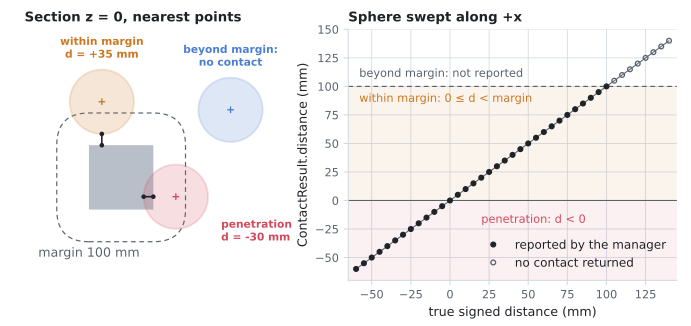
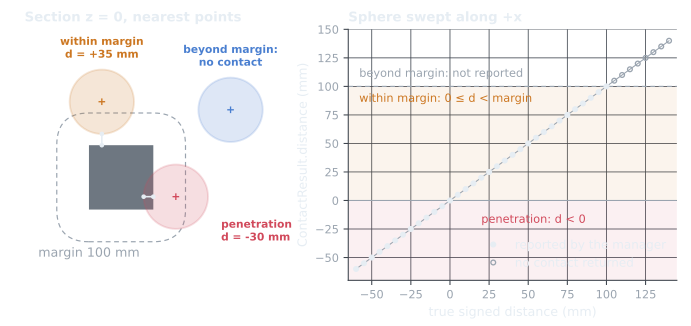
ContactResult.distance is the signed distance, and the margin only decides what is reported. A 0.1 m sphere is swept past a 0.2 m cube against Bullet's default discrete manager with setDefaultCollisionMargin(0.1): every reported distance equals the analytic signed distance (penetration negative), and beyond the 100 mm margin the test returns no contact at all. Left: three states in the z = 0 section with the nearest points the manager returned; the dashed outline is the margin around the cube. Reproduce: pixi run docs-figures collision_distance.The manager's default margin applies to every pair; a pair override takes precedence:
from tesseract_robotics.common import CollisionMarginData

# Default margin for all pairs (applied to the contact manager)
manager.setCollisionMarginData(CollisionMarginData(0.02))  # 2cm

# Or set the default margin directly
manager.setDefaultCollisionMargin(0.02)

# Per-pair override (link-a, link-b, margin)
manager.setCollisionMarginPair("link_6", "obstacle", 0.05)
A planner's collision term has its own margin, set in its profile (see Collision in planning); the manager's margin is what a direct check such as the one above uses.
Discrete, continuous and LVS checks
A discrete check tests one state. A trajectory is a sequence of states, and checking only
those states misses an obstacle the robot passes through between them. Three remedies, chosen
with CollisionEvaluatorType:
| Evaluator | Checks | Between checks |
|---|---|---|
DISCRETE |
each trajectory state | nothing is checked |
LVS_DISCRETE |
each state, plus interpolated states no more than longest_valid_segment_length apart |
nothing is checked: a thin obstacle needs a short segment |
LVS_CONTINUOUS |
each interpolated segment as a cast: every link swept from its start to its end pose | covered; the cast is the convex hull of the two poses, so short segments keep it close to the links' real arcs |
CONTINUOUS |
each trajectory segment as one cast | covered, with the same convex-hull approximation over the whole segment |
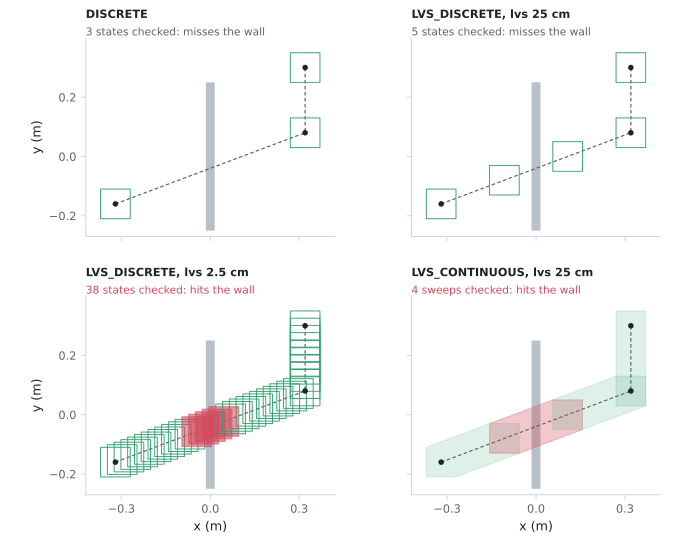
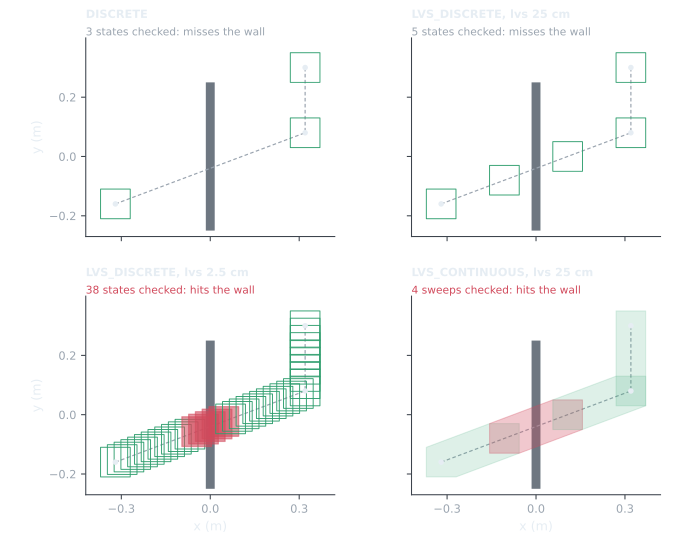
checkTrajectory runs on the same three states with each evaluator. DISCRETE checks the waypoints and misses the wall; LVS_DISCRETE with a 25 cm segment length interpolates 5 states and still misses it; at 2.5 cm, 5 of its 38 states hit. LVS_CONTINUOUS casts the cube between the same 25 cm sub-states and catches the wall in the sweep that crosses it. Green: checked and clear; red: in contact. Reproduce: pixi run docs-figures continuous_collision.The task composer's contact check task and TrajOpt's collision terms both take a
CollisionCheckConfig with this type and segment length:
from tesseract_robotics.trajopt_ifopt import TrajOptCollisionConfig
from tesseract_robotics.collision import CollisionEvaluatorType

# TrajOptCollisionConfig(margin, coeff)
config = TrajOptCollisionConfig(0.025, 20.0)  # 2.5cm margin, coeff=20
config.collision_margin_buffer = 0.005  # Additional buffer beyond margin
config.collision_check_config.type = CollisionEvaluatorType.LVS_DISCRETE
config.collision_check_config.longest_valid_segment_length = 0.05  # 5cm interpolation
Contact managers
The environment builds its managers from the contact manager plugins its SRDF names. The
example robots use the configuration below; getDiscreteContactManager() and
getContinuousContactManager() return a copy of the default one, synchronised with the
environment's current state.
| Kind | Plugin | Default |
|---|---|---|
| discrete | BulletDiscreteBVHManager |
yes |
| discrete | BulletDiscreteSimpleManager |
|
| discrete | FCLDiscreteBVHManager |
|
| continuous | BulletCastBVHManager |
yes |
| continuous | BulletCastSimpleManager |
Contact managers builds them from the plugin factory and switches between them.
Request options
from tesseract_robotics.collision import (
    ContactRequest,
    ContactResultMap,
    ContactTestType,
)

# Get discrete manager
manager = robot.env.getDiscreteContactManager()

# Configure request
request = ContactRequest(ContactTestType.ALL)  # or .FIRST, .CLOSEST, .LIMITED
request.calculate_distance = True
request.calculate_penetration = True

# Sync manager with current state
manager.setActiveCollisionObjects(robot.env.getActiveLinkIds())
manager.setCollisionObjectsTransform(robot.env.getState().link_transforms)
manager.setDefaultCollisionMargin(0.05)  # 5cm margin

# contactTest populates `contacts` in-place
contacts = ContactResultMap()
manager.contactTest(contacts, request)

# Iterate pairs via flattened vector (simplest idiom)
from tesseract_robotics.collision import ContactResultVector
results = ContactResultVector()
contacts.flattenMoveResults(results)
for i in range(len(results)):
    r = results[i]
    print(f"{r.link_ids[0]} <-> {r.link_ids[1]}: {r.distance:.4f}m")
ContactTestType.FIRST stops at the first contact, CLOSEST keeps the closest per pair, and
ALL keeps every contact; LIMITED stops after a set count.
Continuous checks
Check for collisions along a motion segment. Each active link needs a start and end transform, set with the three-argument (or two-mapping) setCollisionObjectsTransform:
from tesseract_robotics.collision import (
    ContactRequest,
    ContactResultMap,
    ContactTestType,
)

# Resolve link transforms at the two endpoints
joint_names = robot.get_joint_names("manipulator")
start_transforms = robot.env.getState(joint_names, start_joints).link_transforms
end_transforms = robot.env.getState(joint_names, end_joints).link_transforms

# Get continuous manager
manager = robot.env.getContinuousContactManager()
manager.setActiveCollisionObjects(robot.env.getActiveLinkIds())

# Set start and end poses per link
for link_name, pose_start in start_transforms.items():
    pose_end = end_transforms[link_name]
    manager.setCollisionObjectsTransform(link_name, pose_start, pose_end)

# Check swept volume
contacts = ContactResultMap()
manager.contactTest(contacts, ContactRequest(ContactTestType.ALL))
Each continuous ContactResult says where along the sweep the contact happened. cc_time[i] is in [0, 1] for a cast link i and -1 for a static one. cc_type[i] is a ContinuousCollisionType: CCType_Time0, CCType_Time1, CCType_Between, or CCType_None for a link that was not cast.
Check a trajectory
checkTrajectory (from environment) checks a whole joint trajectory and stops at the first collision. It is a port of the C++ tesseract::environment::checkTrajectory, with one difference: C++ fills a contacts out-parameter, while Python gets it back as the second element of the returned tuple. That element holds one ContactResultMap per checked step or segment.
import numpy as np

from tesseract_robotics.collision import CollisionCheckConfig, CollisionEvaluatorType
from tesseract_robotics.environment import checkTrajectory

traj = np.linspace(start_joints, end_joints, 10)  # (steps, joints), one row per step

config = CollisionCheckConfig()
config.type = CollisionEvaluatorType.DISCRETE  # CONTINUOUS with a continuous manager

manager = env.getDiscreteContactManager()
# By joint group...
results, contacts = checkTrajectory(manager, env.getJointGroup("manipulator"), traj, config)
# ...or by state solver + joint names (same order as the trajectory columns)
names = env.getGroupJointIds("manipulator")
results, contacts = checkTrajectory(manager, env.getStateSolver(), names, traj, config)

if results:  # ContactTrajectoryResults is truthy when any step collided
    print(results.condensedSummary())
    worst = results.worstStep()  # ContactTrajectoryStepResults: .step, .substeps, .state0/.state1
Every overload accepts either a DiscreteContactManager or a ContinuousContactManager. The GIL is released while the trajectory is checked.
To check one state or one segment instead of a whole trajectory, use checkTrajectoryState or
checkTrajectorySegment; both return a ContactResultMap. See
Single-state collision checks.
Allowed collision matrix
Skip collision checks for adjacent or always-safe pairs. The ACM lives on the scene graph and is owned by the environment:
# Fetch the ACM (mutable via scene graph commands on the environment)
acm = robot.env.getAllowedCollisionMatrix()

# Query whether a pair is allowed
if acm.isCollisionAllowed(("link_1", "link_2")):
    print("link_1 and link_2 are whitelisted")
To add entries, issue a scene graph command through the environment (see car_seat_example.py for the canonical pattern):
from tesseract_robotics.common import AllowedCollisionMatrix
from tesseract_robotics.environment import (
    ModifyAllowedCollisionsCommand, ModifyAllowedCollisionsType,
)

additions = AllowedCollisionMatrix()
additions.addAllowedCollision("gripper", "workpiece", "Attached")
robot.env.applyCommand(
    ModifyAllowedCollisionsCommand(additions, ModifyAllowedCollisionsType.ADD)
)
Adjacent links already defined in the SRDF are added automatically when the environment is loaded.
Batch updates
Adding, removing, enabling or moving many objects one call at a time pays a broadphase update per call. The batch calls apply one update per batch where the backend supports it, and behave as the single calls in order:
from tesseract_robotics.collision import CollisionObjectSpec

specs = [CollisionObjectSpec(name, 0, shapes, shape_poses) for name in ("a", "b", "c")]
assert manager.addCollisionObjects(specs)  # a repeated id: the last entry decides

manager.setCollisionObjectsEnabled(["b"], False)     # or a dict: {"b": False, "c": True}
manager.setCollisionObjectsTransform(["a", "c"], {name: pose for name in "abc"})  # ids, then a map
pose = manager.getCollisionObjectsTransform("a")
manager.removeCollisionObjects(["a", "c"])
An id the manager does not hold is reported, never silently dropped: removeCollisionObjects
and setCollisionObjectsEnabled return False (the ids that are present are still applied),
and getCollisionObjectsTransform or a transform map that lacks an id raises IndexError.
Poses already held in one (K, 4, 4) float64 array (the layout of Isometry3d.compose_each and
Environment.link_transforms_batch) go in as the array, with no Isometry3d per object:
import numpy as np

poses = np.tile(np.eye(4), (3, 1, 1))  # (K, 4, 4): row k is the world pose of ids[k], metres
poses[:, 0, 3] = [0.0, 0.5, 3.0]
manager.setCollisionObjectsTransform(["a", "b", "c"], poses)
It sets what the (ids, list[Isometry3d]) overload sets, at about the cost of the native call.
Every row is checked as Isometry3d(matrix) checks it before any object moves: a row that is not
a rigid transform raises NotRotationError naming its index, and len(ids) != K raises
TransformCountMismatchError (a ValueError). As with the list overload, an id the manager does
not hold is skipped without an error. A stack that is not C-contiguous float64 is converted first;
another shape matches no overload (TypeError). The GIL is released while the transforms are set.
Implicit signed-distance shapes
collideImplicitSDF finds the contacts between two shapes given as signed-distance callbacks:
a multi-start search inside each shape's bounding box. makeImplicitSDFShape builds one from a
box, sphere, cylinder, cone, capsule or SignedDistanceField at a world pose; other geometry
gives a shape whose isValid() is False. A shape's distance and gradient may also be
Python callables:
import numpy as np
from tesseract_robotics.collision import (
    ImplicitSDFCollisionConfig, ImplicitSDFShape, collideImplicitSDF, makeImplicitSDFShape,
)
from tesseract_robotics.geometry import Sphere

ball = ImplicitSDFShape()
ball.distance = lambda p: float(np.linalg.norm(p) - 0.5)   # negative inside
ball.gradient = lambda p: p / np.linalg.norm(p)
ball.aabb = (np.full(3, -0.5), np.full(3, 0.5))             # (min, max), world frame

config = ImplicitSDFCollisionConfig()
config.contact_margin = 0.5
other = makeImplicitSDFShape(Sphere(0.3), pose)            # pose: Isometry3d
contacts = collideImplicitSDF(ball, other, config)          # list[ImplicitSDFContact]
collideImplicitSDF releases the GIL; a Python callback takes it back for each evaluation, so
Python shapes are correct but slow.
Collision in planning
Planners check collisions themselves; you configure them through profiles, not through the
contact manager. TrajOpt's collision term is a TrajOptCollisionConfig (margin, coefficient,
evaluator type) in its composite profile; OMPL validates sampled states and motions with the
collision check config of its profile; TrajOptPipeline, FreespacePipeline and the Descartes
pipelines finish with a discrete contact check task over the result. The stock profiles are built in
planning/profiles/trajopt.py;
Costs vs constraints shows when to make
collision a cost and when a constraint.
Collision geometry
Every geometry type of tesseract_robotics.geometry can be a collision shape: Box, Sphere,
Cylinder, Capsule, Cone, Mesh, ConvexMesh, Octree and SignedDistanceField
(discrete managers only). A Mesh keeps its triangles; a ConvexMesh is a convex hull, which
fills a concave part's hollows, so a concave part needs several hulls (convex decomposition).
Convex hulls
For complex meshes, use makeConvexMesh to build a convex hull:
To load a convex mesh directly from a file, use the planning helper:
Point clouds as obstacles
Sensor-derived obstacles — depth-camera scans, LiDAR, fused mapping output —
go through a geometry.Octree. Each occupied voxel becomes a
sub-shape the discrete contact manager checks against the robot, so
planners and collision queries treat the cloud like any other
geometry.
1. Build the octree and attach it as a link.
Load your points into a PointCloud, pass it through createOctree, and wrap
the result in geometry.Octree. Then hand the geometry to
create_obstacle().
import numpy as np
from tesseract_robotics.planning import Pose, create_obstacle
from tesseract_robotics.geometry import (
    Octree, OctreeSubType, PointCloud, createOctree,
)

# verts: (N, 3) float64 ndarray — pulled from your loader of choice
pc = PointCloud()
for x, y, z in verts:
    pc.addPoint(float(x), float(y), float(z))

# resolution = leaf edge length in metres; smaller = finer = more sub-shapes
octree = Octree(createOctree(pc, resolution=0.02, prune=True, binary=True),
                OctreeSubType.BOX, pruned=True, binary_octree=True)

create_obstacle(
    robot,
    name="scan",
    geometry=octree,
    transform=Pose.from_xyz(1.3, 0.3, 0.0),
)
OctreeSubType picks the per-leaf primitive — BOX is the cheap default,
SPHERE_INSIDE/SPHERE_OUTSIDE use inscribed/circumscribed spheres if you
need rounder swept volumes.
2. Margins. The discrete contact manager applies a margin to every pair (see Contact Margins). For an octree obstacle the defaults work fine — set a single value on the manager:
manager = robot.env.getDiscreteContactManager()
manager.setActiveCollisionObjects(robot.env.getActiveLinkIds())
manager.setCollisionMarginData(CollisionMarginData(0.02))  # 2 cm safety buffer
TrajOpt-based planners route around the cloud out of the box —
create_trajopt_default_profiles() enables both the collision cost
(coeff=50) and the collision constraint (coeff=10) against every
geometry in the env, including the octree. No octree-specific tuning
needed.
Choosing a resolution
The leaf size is the dominant cost knob — halving it roughly 8×s the sub-shape count. A 1–2 cm leaf is a typical starting point for depth-camera scans of a tabletop workspace; coarsen aggressively for full-room scans. At sub-centimetre resolutions TrajOpt can saturate its iteration budget; coarsen until the planner converges.
For a full collision-aware vs. collision-disabled comparison with a viewer walkthrough, see the Point cloud → Octree example.
Signed distance fields as obstacles
A geometry.SignedDistanceField stores the distance to a surface —
negative inside, positive outside — sampled on a regular grid, rather than
storing the surface itself. Two reasons to reach for one over a mesh or an
octree:
- Concave shapes work. A
ConvexMeshcannot represent a pocket or a bore, and the fullMeshpath that can is the slowest option. An SDF handles concavity natively. - It is already your native format. Fused mapping output (nvblox, VDB ESDFs, TSDF integration) is a distance field. Feeding it in directly avoids meshing it first and then throwing the distance information away.
Requires a discrete-only environment
An SDF is concave, so continuous (cast) managers reject it — and an
Environment populates every manager its contact-manager plugin config
declares. Against the stock config, which declares a cast manager, merely
adding an SDF link fails with RuntimeError: I can only collision check
convex shapes and compound shapes made of convex shapes.
The fix is configuration, not code: point the SRDF at a
contact_manager_plugins.yaml with no continuous_plugins block (step 2
below). Such an environment then behaves normally for SDFs —
create_obstacle(), contact tests, margins — at the cost of having no
continuous/cast collision checking at all.
The snippets below are loaded directly from
sdf_collision_example.py,
so they are the code that actually runs — see Runnable example
at the end of the section.
1. Build the field.
Write the distance function and sample it onto a grid with
createDiscreteSignedDistanceField. Pass batched=True to receive all (N, 3)
sample points in one call and return N distances — one Python call instead of
dimensions.prod(), and the natural shape for a numpy or GPU evaluator. The
obstacle here is a ball with a cylindrical bore — concave, so no convex hull
applies:
def bored_ball(points: np.ndarray) -> np.ndarray:
    """
    Signed distance to a ball with a cylindrical bore, for an `(N, 3)` array of points.

    This is the *batched* form: it receives every sample point in one call and returns one
    distance per point. Passing `batched=True` alongside it means one Python call instead of
    `dimensions.prod()` of them - the shape a vectorised or GPU evaluator wants.

    CSG subtraction is `max(solid, -cut)`: `ball` is negative inside the sphere, and
    `bore` is positive inside the cylinder, so taking the max carves the cylinder out.
    """
    ball = np.linalg.norm(points, axis=1) - BALL_RADIUS
    bore = BORE_RADIUS - np.linalg.norm(points[:, :2], axis=1)
    return np.maximum(ball, bore)


def build_field():
    """Sample `bored_ball` onto a dense grid and return the geometry."""
    return createDiscreteSignedDistanceField(
        bored_ball,
        domain_min=np.full(3, -DOMAIN_HALF_EXTENT),
        domain_max=np.full(3, DOMAIN_HALF_EXTENT),
        dimensions=np.full(3, SAMPLES_PER_AXIS, dtype=np.int32),
        batched=True,
    )
dimensions is the sample count per axis, so the voxel size is
(domain_max - domain_min) / (dimensions - 1). The sampling happens once,
during this call: the returned geometry holds no reference back to your
callable, so nothing takes the GIL during collision checking.
A field baked offline loads the same way — readSignedDistanceFieldVDB
(OpenVDB) and readSignedDistanceFieldNVDB (NanoVDB) take the raw file bytes:
from pathlib import Path
from tesseract_robotics.geometry import readSignedDistanceFieldVDB

field = readSignedDistanceFieldVDB(Path("scan.vdb").read_bytes())
2. Configure the environment with discrete plugins only.
Write a contact_manager_plugins.yaml that omits the continuous_plugins
block. hasContinuousContactManagerPlugins() is then false, the Environment
never builds a cast manager, and concave geometry stops being rejected:
contact_manager_plugins:
  search_libraries:
    - tesseract_collision_bullet_factories
    - tesseract_collision_fcl_factories
  discrete_plugins:
    default: BulletDiscreteBVHManager
    plugins:
      BulletDiscreteBVHManager:
        class: BulletDiscreteBVHManagerFactory
      BulletDiscreteSimpleManager:
        class: BulletDiscreteSimpleManagerFactory
      FCLDiscreteBVHManager:
        class: FCLDiscreteBVHManagerFactory
  # no continuous_plugins - that is what makes SDFs loadable here
Point the SRDF at it, exactly as the stock scenes do:
<contact_managers_plugin_config filename="package://my_cell/config/contact_manager_plugins.yaml"/>
3. Attach the field.
Load the robot with that SRDF and add the field. create_obstacle() works here
too, but it always attaches a Visual as well — and a field has no surface, so
the viewer logs an "unsupported visual geometry" warning for it. Splitting the
components keeps the field collision-only, which is what it actually is:
        robot = build_robot(tmpdir / "discrete", DISCRETE_ONLY_CONTACT_MANAGER_PLUGINS)

        # Collision-only: the field is what the contact manager queries, and it has no surface
        # to render. create_obstacle() would work here too - it just also attaches a Visual the
        # viewer cannot draw, so we split the components instead.
        attach_link(robot, "bored_ball", field, collision=True)
4. Check contacts.
From here nothing is SDF-specific — same manager, same margin, same
contactTest:
def sweep(robot: Robot, positions) -> list[tuple[float, float | None, float]]:
    """
    Slide the probe along +x and report the closest distance to the field at each stop.

    Returns `(joint_value, reported_distance_or_None, analytic_gap)` per position. The
    analytic gap is the exact surface-to-surface distance along the sweep axis, which the
    reported value should match inside the margin band.
    """
    manager = robot.env.getDiscreteContactManager()
    manager.setActiveCollisionObjects(["probe"])
    manager.setCollisionMarginData(CollisionMarginData(MARGIN))

    rows = []
    for x in positions:
        robot.set_joints({"probe_x": float(x)})
        manager.setCollisionObjectsTransform(robot.env.getState().link_transforms)

        results = ContactResultMap()
        manager.contactTest(results, ContactRequest(ContactTestType.CLOSEST))
        contacts = ContactResultVector()
        results.flattenMoveResults(contacts)

        reported = contacts[0].distance if len(contacts) else None
        rows.append((float(x), reported, float(x) - BALL_RADIUS - PROBE_RADIUS))
    return rows
SDFs honour the margin band like any other geometry: contacts are reported at
positive distance up to the margin, which is what TrajOpt's collision cost needs
to push links apart before they touch. Sweeping a 0.05 m probe along +x
against the field above gives +0.09, +0.05, +0.02, 0.0000, then negative
once it penetrates, and no contact at all once the gap exceeds the 0.1 m margin —
matching the analytic surface-to-surface gap to four decimals.
BulletDiscreteSimpleManager and FCLDiscreteBVHManager report the same values.
Deep penetration depth is approximate
Reported distance is exact in the margin band and at shallow penetration —
the values above match the analytic gap to four decimals — but deep inside
the solid it is bounded by the probe sampling. Against a plain sphere field
of radius 0.25, a 0.05 probe centred at the origin reports -0.13 where the
true depth is -0.30. That is fine for planning, which only needs the
gradient near the surface, but do not read deep penetration values as exact.
Choosing a resolution
Same trade as an octree leaf size, and the same 8× scaling: dimensions of
65 per axis is 275k samples, 129 is 2.1M. Between samples the field is
trilinearly interpolated, so resolution bounds the geometric error — size it
against the smallest feature you need represented (the bore above needs
several samples across its 0.16 m diameter), not against your margin.
Not the Gazebo SDF
Unrelated to the "SDF" Simulation Description Format. This geometry also
replaces the old SDFMesh, which despite the name was a mesh, not a field.
Runnable example
The snippets above come from
sdf_collision_example.py,
which runs the whole thing end to end — the concave field, the VDB round trip,
the discrete-only environment, the swept distance profile, the rejection you get
without the YAML, and a TesseractViewer animation (a field has no surface, so
it draws the zero level set as a voxel shell):
tesseract_sdf_collision_example
# or
pixi run python -m tesseract_robotics.examples.sdf_collision_example
What goes wrong
| Symptom | Cause | Fix |
|---|---|---|
| No contact, though the robot visibly touches the obstacle | the manager still holds the poses it was created with, or the link is not active | setCollisionObjectsTransform(state.link_transforms) after every state change; setActiveCollisionObjects(env.getActiveLinkIds()) |
| Contacts between neighbouring links in every state | the SRDF's allowed collision matrix lacks the pair | add the pair to the SRDF or with ModifyAllowedCollisionsCommand |
A contact with distance > 0 |
the margin is above zero: the pair is near, not touching | treat distance < 0 as collision, or set the margin to 0 |
| A trajectory passes the check and still hits a thin obstacle | DISCRETE checks only the states |
LVS_DISCRETE with a segment shorter than the obstacle, or LVS_CONTINUOUS |
| An obstacle added to the environment is never reported | the manager was fetched before the obstacle was added | fetch the manager again after changing the environment |
To see what a manager reports in one state:
from tesseract_robotics.collision import (
    ContactRequest,
    ContactResultMap,
    ContactResultVector,
    ContactTestType,
)

def debug_collision(robot, joints, joint_names):
    """Print detailed collision info."""
    robot.set_joints(joints, joint_names=joint_names)
    state = robot.env.getState()

    manager = robot.env.getDiscreteContactManager()
    manager.setActiveCollisionObjects(robot.env.getActiveLinkIds())
    manager.setCollisionObjectsTransform(state.link_transforms)

    contacts = ContactResultMap()
    manager.contactTest(contacts, ContactRequest(ContactTestType.ALL))

    if contacts.size() == 0:
        print("No collisions detected")
        return

    results = ContactResultVector()
    contacts.flattenMoveResults(results)
    print(f"Found {len(results)} contact(s):")
    for i in range(len(results)):
        r = results[i]
        print(f"\n  Contact {i + 1}:")
        print(f"    Links: {r.link_ids[0]} <-> {r.link_ids[1]}")
        print(f"    Distance: {r.distance:.4f} m")
        print(f"    Normal: {r.normal}")
        if r.distance < 0:
            print(f"    PENETRATION: {-r.distance:.4f} m")
Next steps
- Motion planning: collision as a cost or a constraint.
- Low-level SQP: collision constraints in a replanning loop.
- Collision examples: contact managers, trajectory checks, convex decomposition.