The environment is the central manager for robot state, scene graph, collision checking, and command history.
The Tesseract Environment is the primary interface for interacting with your robot model at runtime. It wraps the scene graph, state solver, and contact managers into a single, thread-safe manager that supports live modification of the robot description.
Overview
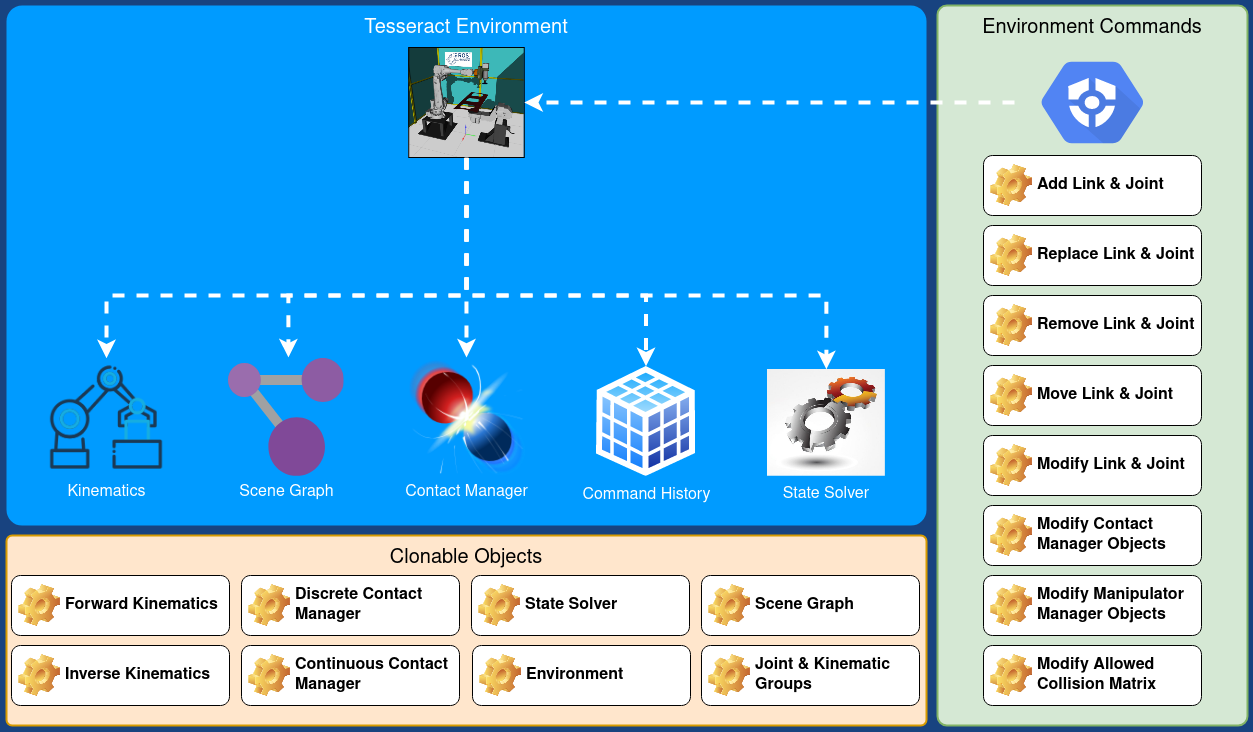
Tesseract Environment Architecture
The environment integrates several subsystems:
| Component | Purpose |
| Scene Graph | Stores links, joints, and their connectivity |
| State Solver | Computes forward kinematics and joint-to-Cartesian transforms |
| Contact Managers | Discrete and continuous collision checking |
| Command History | Tracks every modification for replay/serialization |
Design Philosophy
Cloning for Performance
A critical design decision that distinguishes Tesseract from MoveIt is the cloning strategy.
MoveIt requires that all const functions be thread-safe. This imposes a performance penalty: planning functions must copy data defensively, and shared state requires synchronization.
Tesseract takes a different approach: the environment (and most components) can be cloned via deep copy. This enables:
- Process planners to allocate a cloned environment per planner and per thread
- Non-const access within each clone — no locking, no contention
- Optimal performance during motion planning and real-time execution
- Obstacle avoidance with independent environment copies tracking different sensor streams
Command History Pattern
Almost every aspect of the environment can be changed at runtime — links added, joints moved, collision rules modified, new objects inserted. This flexibility adds complexity.
To manage it, Tesseract uses the command pattern: every modification to the environment is recorded as a command in an ordered history. This provides:
- Full audit trail of every change made to the environment (valuable for debugging in production)
- Exact replication — replay the command history to create an identical environment
- Independence from URDF/SRDF files — once the initial files are processed, all information lives in the internal data structures (scene graph, state solver, etc.) and is stored in the command history. The URDF and SRDF are no longer required.
- Serialization — command history can be saved and restored
Restrictions vs. Scene Graph
While the scene graph supports disconnected subgraphs (you can add a link without a joint), the environment enforces stricter rules:
- Everything must form one connected graph
- Adding a link without a joint automatically creates a fixed joint to the base link
- Removing a link or joint removes all children in the subtree
These restrictions ensure the environment always represents a valid, plannable robot model.
Basic Usage
Creating an Environment
#include <tesseract_environment/environment.h>
auto env = std::make_shared<tesseract_environment::Environment>();
tesseract_common::fs::path urdf_path("/path/to/robot.urdf");
tesseract_common::fs::path srdf_path("/path/to/robot.srdf");
auto locator = std::make_shared<tesseract_common::GeneralResourceLocator>();
env->init(urdf_path, srdf_path, locator);
Modifying the Environment
auto link = std::make_shared<tesseract_scene_graph::Link>("obstacle");
auto box = std::make_shared<tesseract_geometry::Box>(0.1, 0.1, 0.1);
tesseract_scene_graph::Visual::Ptr visual = std::make_shared<tesseract_scene_graph::Visual>();
visual->geometry = box;
link->visual.push_back(visual);
tesseract_scene_graph::Collision::Ptr collision = std::make_shared<tesseract_scene_graph::Collision>();
collision->geometry = box;
link->collision.push_back(collision);
auto joint = std::make_shared<tesseract_scene_graph::Joint>("obstacle_joint");
joint->parent_link_name = "base_link";
joint->child_link_name = "obstacle";
joint->type = tesseract_scene_graph::JointType::FIXED;
env->applyCommand(std::make_shared<tesseract_environment::AddLinkCommand>(*link, *joint));
Cloning for Planning
auto planning_env = env->clone();
planning_env->applyCommand(...);
Next Steps

 1.9.8
1.9.8